
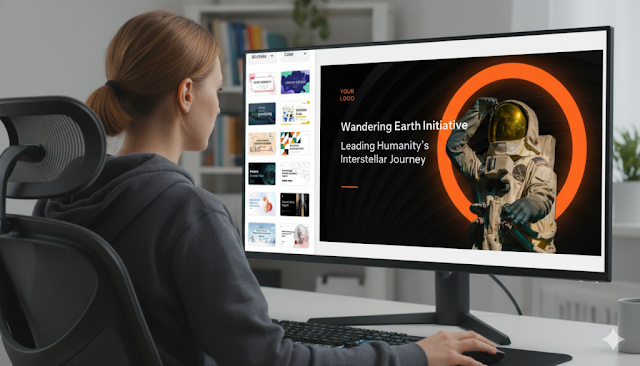
Upload your document (DOCX, PDF) or paste text into the AI PPT maker. Use a specific prompt like, "Create a 10-slide investor pitch deck focusing on the market opportunity and financial projections." Review the AI-generated slide outline before creating full visuals to ensure proper flow.
Phase 3: Refine and Polish the Output
Add the essential human touch. Use the built-in editor to adjust wording, replace generic stock images with your own, and ensure all data is accurate. This phase turns the AI draft into a final, polished presentation.
Pro Tips for Maximizing Your AI Presentation Maker
Use these strategies to work faster and get better results.
- Use Specific Prompts: Instead of "make a presentation," try "create a persuasive sales deck for tech clients with a modern, blue theme."
- Select a Template First: Choose a visual style that suits your audience before generation to minimize later edits.
- Structure Data Clearly: Label numbers and tables clearly in your source text so the AI can accurately convert them into charts.
Common Mistakes to Avoid with AI Slide Makers
Avoid these pitfalls to maintain high-quality presentations.
- Avoid the "Wall of Text": Don't force the AI to use every sentence. Trust its summarization to keep slides clean and readable.
- Don't Skip the Review: Always check the AI's output for factual accuracy and correct any misinterpretations.
- Customize Generic Visuals: Replace key AI-selected images with your own photos, logos, or screenshots to add authenticity.
Mastering Automated Presentation Design
The future of business communication is automated design. By effectively using an AI PPT maker, you delegate structure and formatting to focus on your narrative and refinement. This hybrid approach—AI-powered drafting combined with human expertise—enables the creation of stunning, professional presentations in record time, making rapid text-to-slide conversion an essential modern skill.






Artikel Terkait
10 Tempat Terbaik Beli Blueprint Arc Raiders 2026: Panduan Lengkap & Rekomendasi
Roy Suryo Tolak Restorative Justice: Tak Akan Temui Jokowi Seperti Eggi Sudjana
Kasus Child Grooming di Bogor: Gadis 13 Tahun Hilang Dibawa Pria Dewasa via TikTok
Trump Acungkan Jari Tengah ke Pekerja: Janji Buka Arsip Epstein Terbongkar?